

WooCommerce’s built-in functionality for product attributes allows store owners to define specific characteristics of their products, such as size, color, and material, which are crucial for organizing and managing an online store’s inventory.
nnnn
These attributes play a significant role in Search Engine Optimization (SEO) by providing detailed information that helps search engines understand and rank products more effectively. They also aid user experience in navigating your store and can be used across diverse product offerings.
nnnn
However, store owners often struggle with customizing product options, handling variations, and aligning attributes with customer demands.
nnnn
This guide will show you how to set up WooCommerce product attributes and how using a plugin like Advanced Product Fields (APF) gives you the power to create more complex offerings.
nnnn
Continue reading to learn how to make the most of your WooCommerce platform!
nnnn
Setting up your WooCommerce product attributes step by step
nnnn
Product attributes in WooCommerce are essential for providing detailed information about your products. These attributes, such as color or size, not only help customers understand your products better but also allow for greater specificity across different product variants.
nnnn
Keep in mind that attributes are different from variations: attributes are the terms you use to describe aspects of your products, such as “color” with options like “black”, “red”, and “blue”, or “size” with “XS”, “S”, and “M”. Variations, on the other hand, are specific combinations of these attributes, like a “black” and “XS” shirt.
nnnn
Creating attributes in WooCommerce
nnnn
In WooCommerce, you can set either global attributes or individual ones. Let’s start with how to create global attributes:
nnnn
- n
- Navigate to Products → Attributes in your WordPress dashboard. Here, you can add global attributes applicable to multiple products.
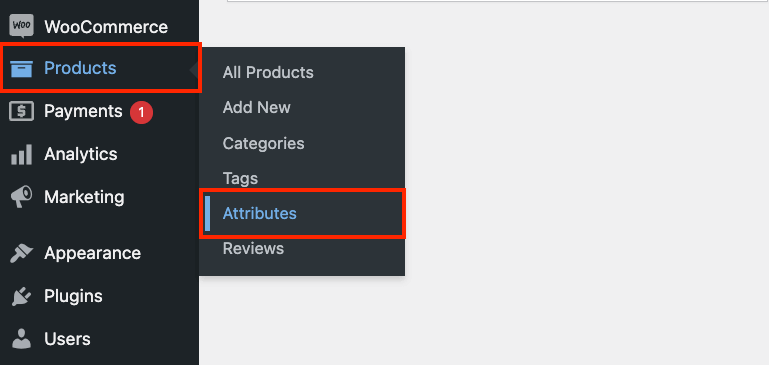
- Enter a name for the attribute (e.g. “Color”) and, if necessary, a slug (a URL-friendly version of the name, e.g. “size”).
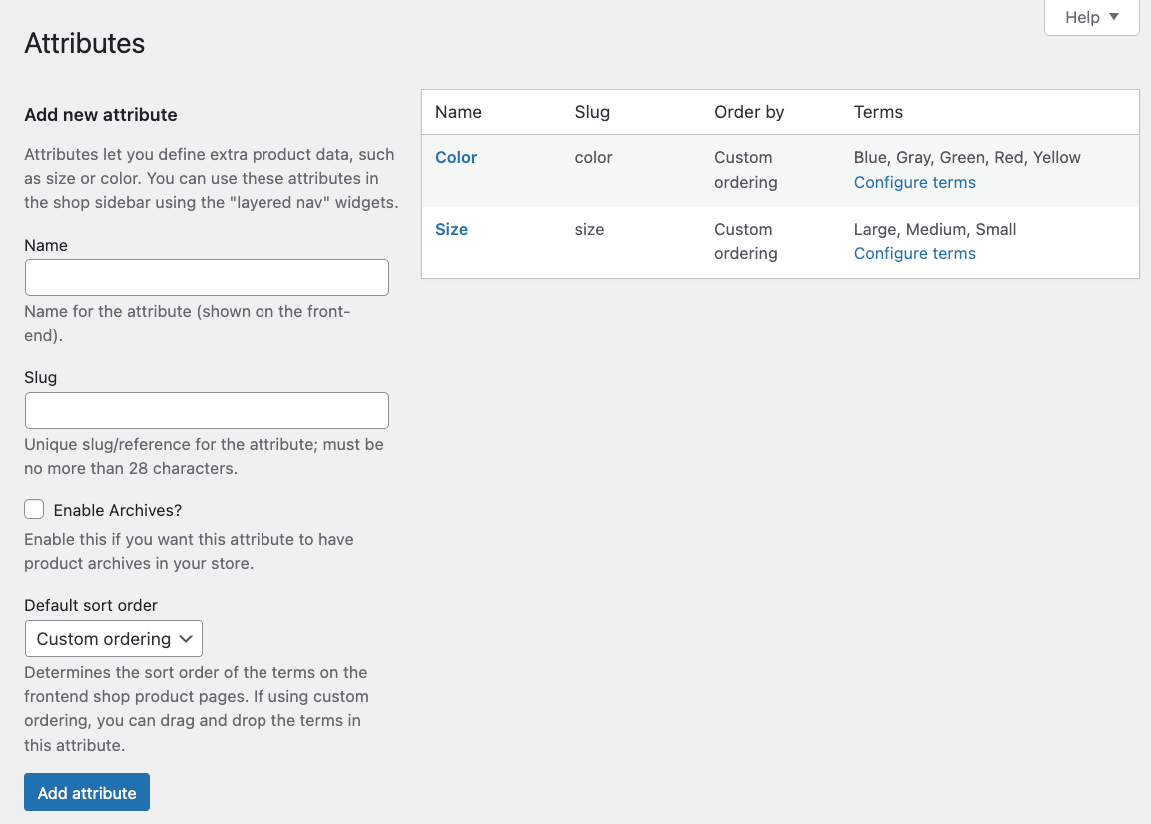
- Enable archives if you want a dedicated page with products that have this attribute.
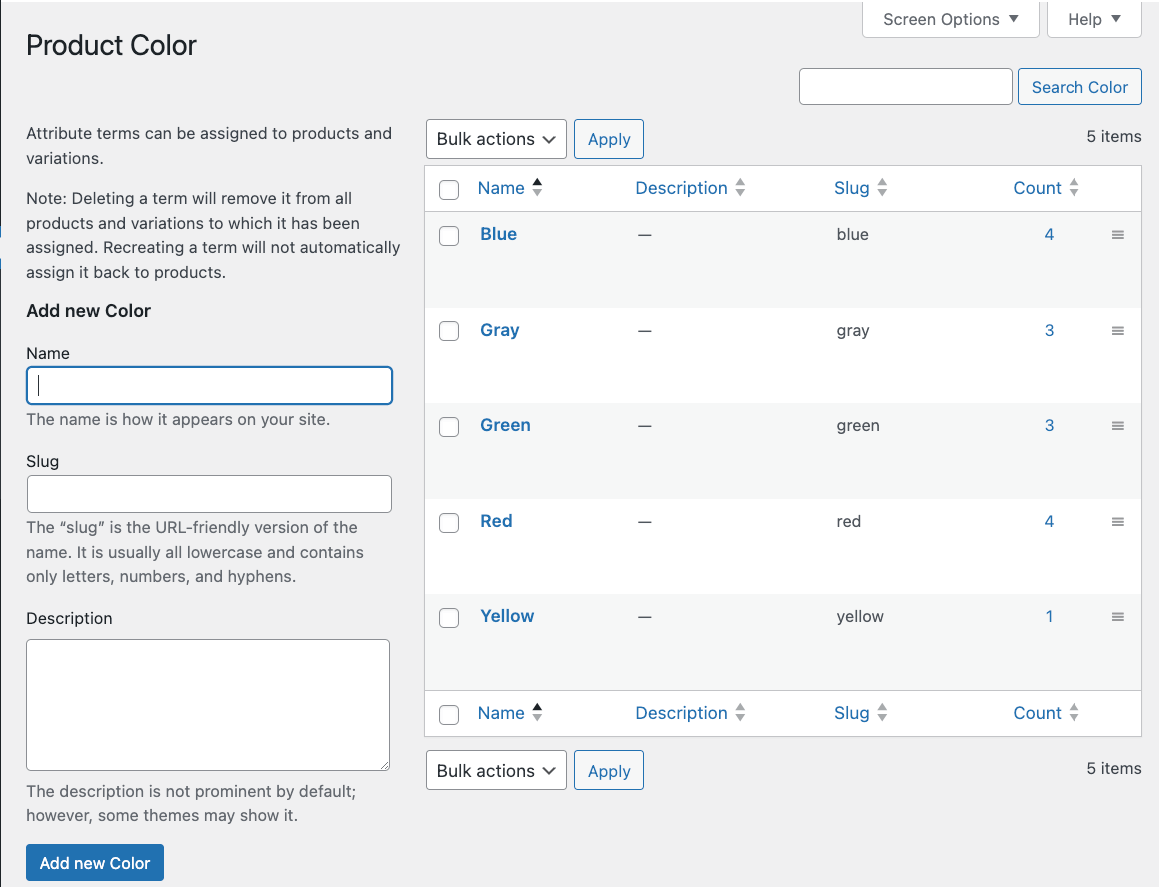
- Click Add attribute to save it, then configure the terms (options like “black”, “red”, “blue”).
nnnn
nnnn
nnnn
n
nnnn
This is how you can add custom attributes for individual products:
nnnn
- n
- Go to the product you want to edit and scroll to the Product data section.
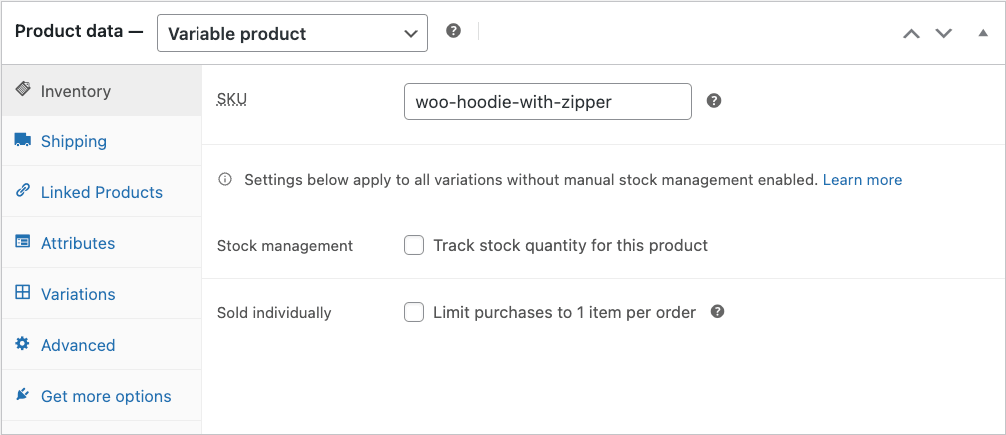
- Select Attributes → Add new.
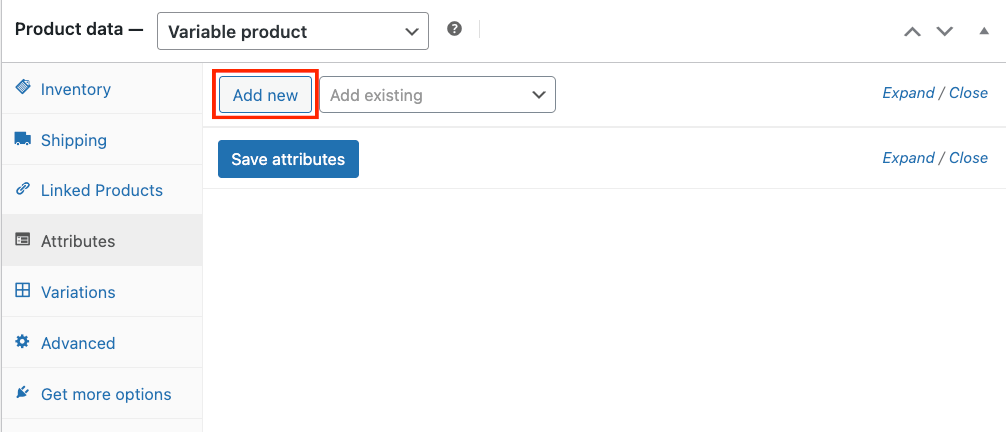
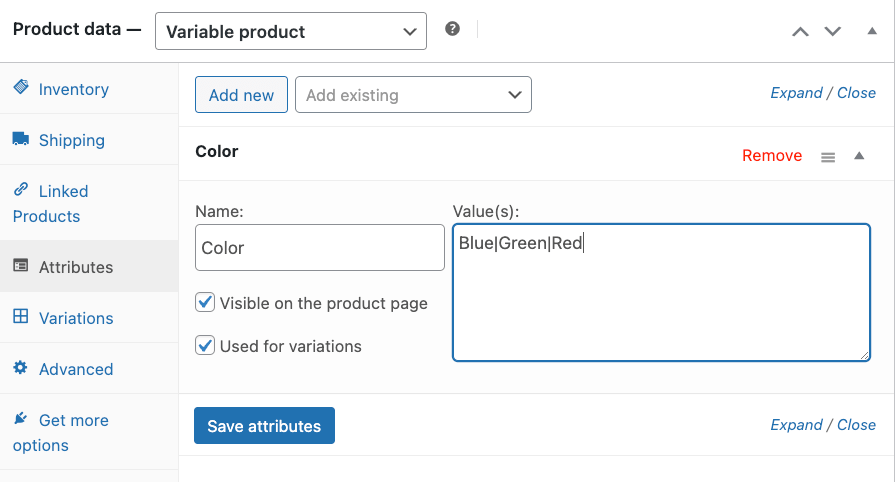
- Write down the attributes you want to add.
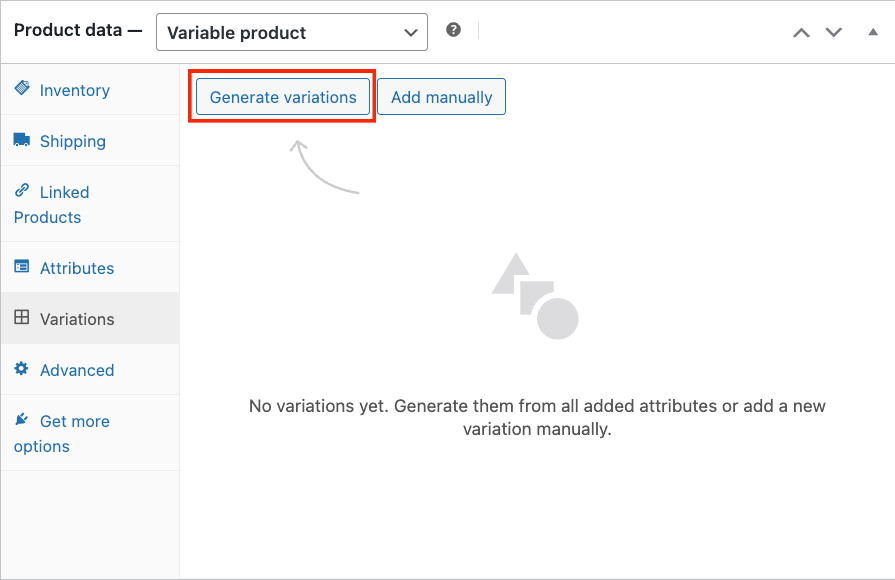
- To create variations based on these attributes, go to Variations → Generate variations.
nnnn
nnnn
nnnn
n
nnnn
Properly setting up attributes is crucial, especially for variable products, as mistakes can complicate creating variations later. These attributes can be used for product variations, filtering in the shop, or sorting products, enhancing your store’s navigability and user experience.
nnnn
Plugins like Advanced Product Fields for WooCommerce can further extend these capabilities, offering more flexibility and customization options for your product pages.
nnnn
Let’s see how!
nnnn
Advanced Product Fields: Enhancing WooCommerce functionality
nnnn
Advanced Product Fields by Studio Wombat significantly enhances WooCommerce functionality, introducing a new dimension of product customization that improves the customer interaction and experience in your online store.
nnnn
APF bridges the gap where WooCommerce’s default settings might fall short, offering a suite of tools designed to display the unique aspects of your products with detailed product information. With APF, you can:
nnnnnnnn
With APF, you can transform customer interactions into engaging and dynamic experiences, increasing customer satisfaction and sales.
nnnn
Creating dynamic pricing and complex forms with APF
nnnn
APF excels in creating dynamic pricing structures and constructing complex forms, especially combined with its sister plugin WooCommerce Quantity Discounts, Rules & Swatches (WQDRS).
nnnn
With these plugins, you can cater to a wide array of product offerings and personalized adjustments. Let’s see how.
nnnn
Dynamic pricing
nnnn
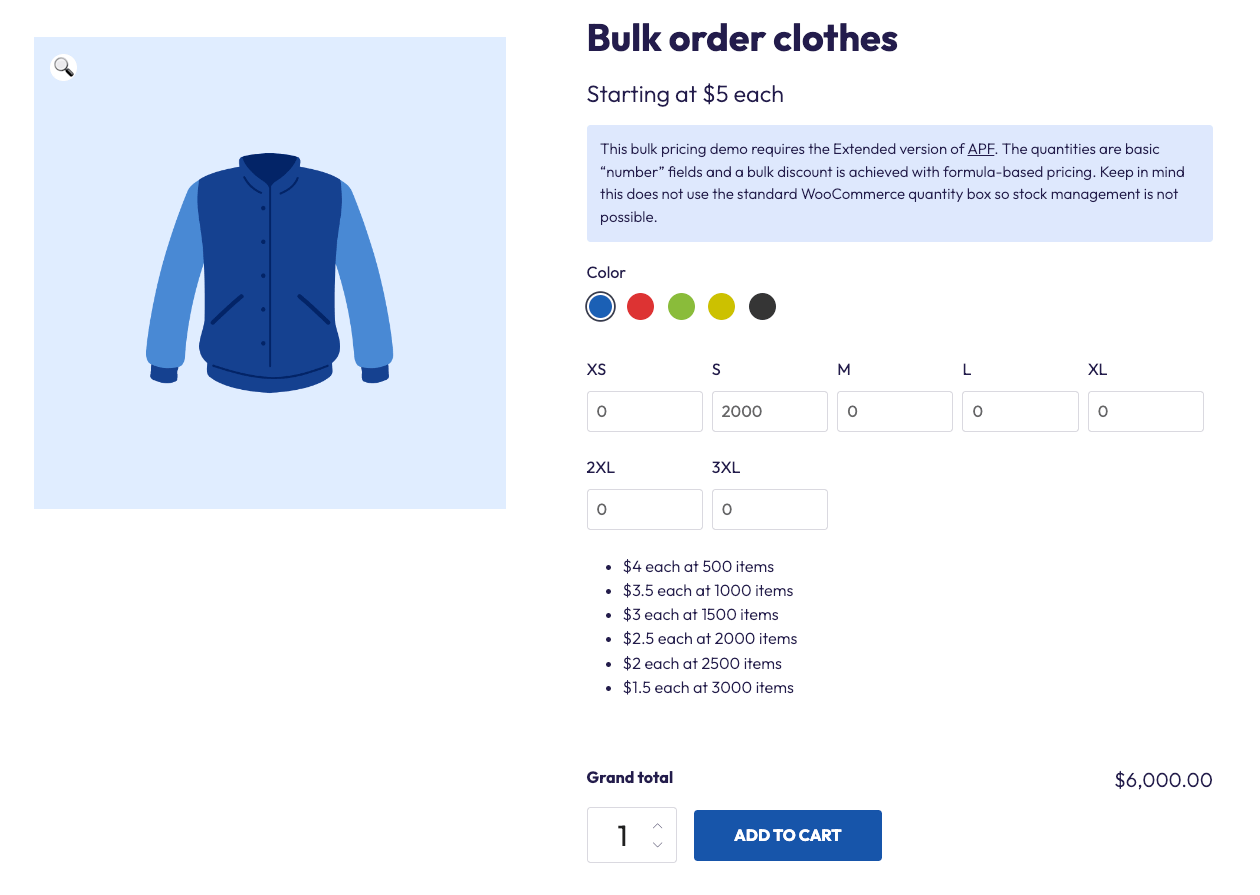
Dynamic pricing allows online stores to adjust the price of their products based on various factors such as demand, customer behavior, market conditions, or inventory levels. In a WooCommerce store, this could include offering discounts on bulk purchases and other quantity-based discounts, BOGO (Buy One Get One) discounts, or implementing flash sales where prices are temporarily lowered to drive immediate sales. For example, if you wanted to offer products in bulk, which is perfect for wholesale stores, you can include a text field to show the pricing and create the different pricing tiers in the backend:
nnnn
nnnn
As you can see, because we chose 2000 units, the price is calculated accordingly at $3 per item rather than $5.
nnnn
With APF and WQDRS, you can also take advantage of the following:
nnnnnnnn
Complex forms
nnnn
Utilize APF to build forms that include text inputs, dropdowns, checkboxes, or radio buttons. This flexibility allows for detailed customer customization requests.
nnnn
- n
- Go to the product edit page →Product data, and click on Custom fields.
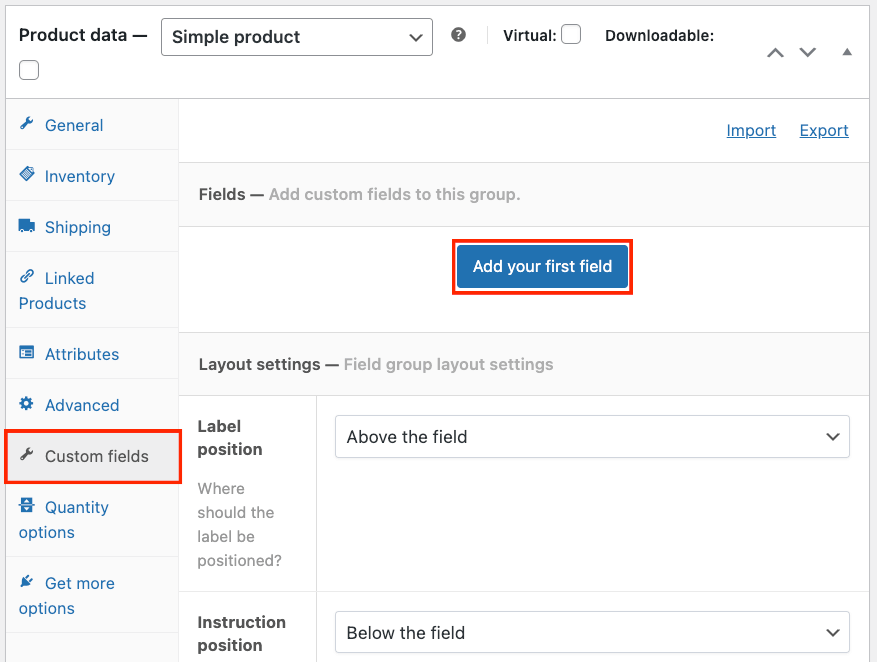
- Add a new field and customize it to your product. Here are some of your options:n
- n
- The type, label, and instructions.
- Whether it’s required or not.
- Whether it can adjust the pricing – for example, adding a back logo to a T-shirt will increase the price.
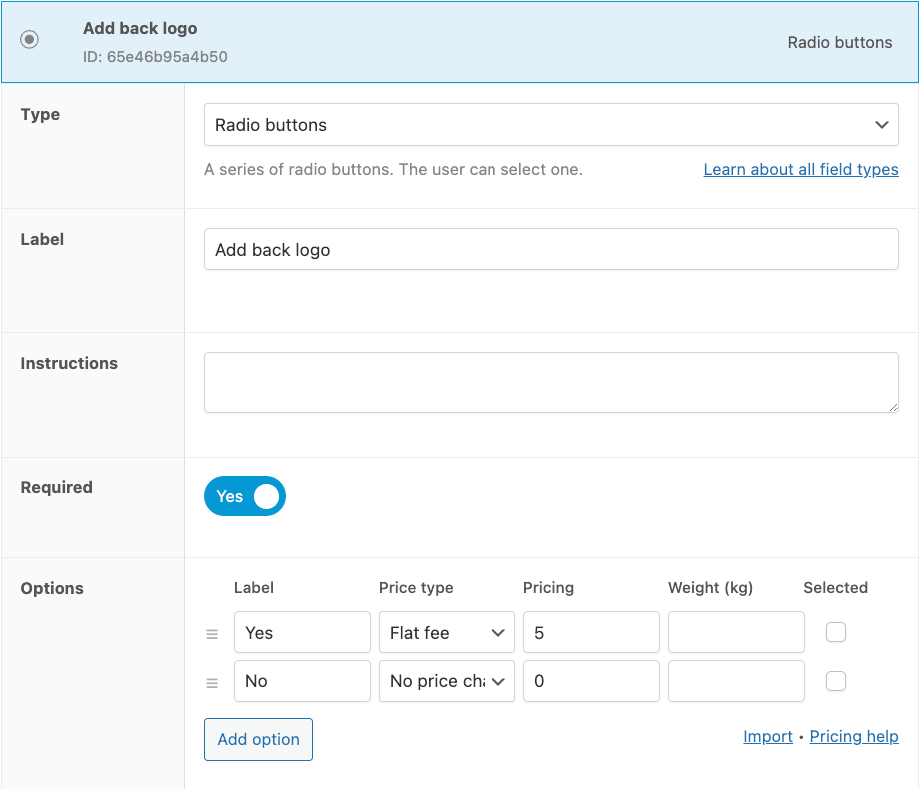
- And much more!
nnnn
nnnn
nnnn
n
n
- Add as many fields as you need – APF offers 16 different field types!
nnnn
nnnn
n
nnnn
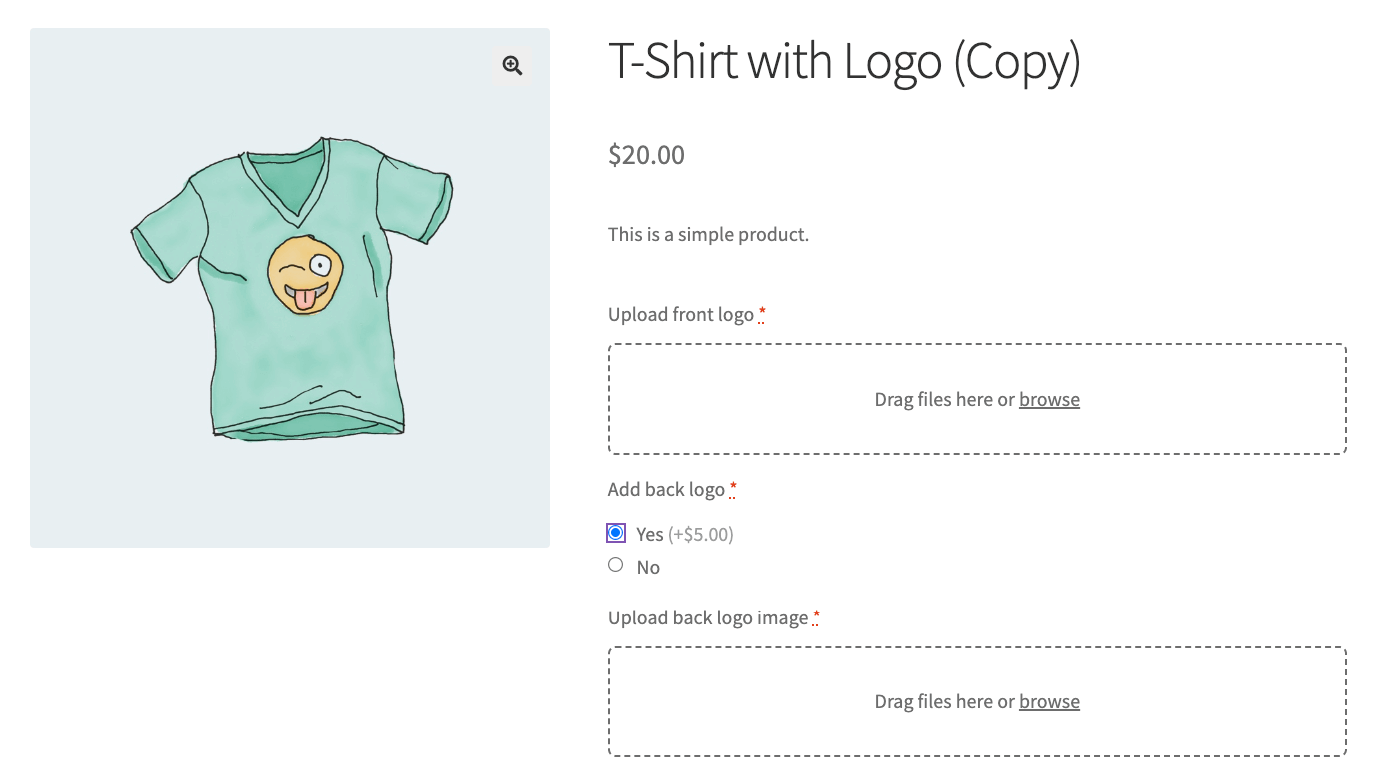
You can also implement conditional logic to display or hide fields based on the choices made by the customer, keeping the customization process streamlined and relevant. For example, if you have the option for a back logo, you can make an image upload field only if the customers choose to have one.
nnnn
This is how it would look on the back end.
nnnn

nnnn
Now, the second upload field will only show up if the customer chooses to add a back logo.
nnnn
nnnn
Real-time pricing
nnnn
APF’s real-time calculation feature updates the total product price as customers make their selections, providing immediate feedback on the cost implications of their choices. This happens as you choose whether a field can change the pricing, like in the example above.
nnnn
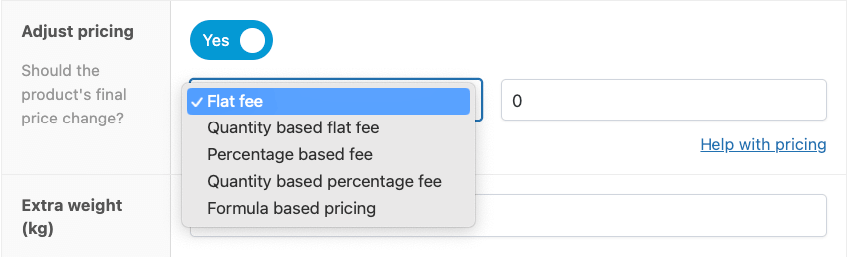
You can customize pricing adjustments per field, whether through fixed price increases, percentage-based adjustments, or using custom formulas to meet specific pricing strategies.
nnnn
nnnn
Optimizing your product attributes for better conversions
nnnn
Optimizing product attributes is a crucial step in enhancing your WooCommerce store’s conversion rates.
nnnn
n
“The way you present and manage these attributes can significantly influence a customer’s purchasing decision. It’s essential to consider not just what information you provide but also how you present it.”
n– Maarten Belmans, Founder of Studio Wombat
nnnn
Here are some good practices for product attribute management:
nnnn
- n
- Keep attribute naming consistent: Inconsistencies in attribute names, such as using “size” for some products and “dimensions” for others, can confuse customers. Similarly, ensure that attribute values are consistent (e.g. using either cm or inches across all products) to help customers accurately compare products.
- Avoid overloading product pages with attributes: While detailed product information is valuable, too much can overwhelm customers. Utilizing conditional logic, as provided by Advanced Product Fields, to hide fields until needed can help you maintain a clean and user-friendly product page.
- Ensure an organized attribute structure: Poorly organized attributes can deter customers. Attributes should be structured intuitively, aligned with how customers typically search and compare products. This improves navigation and enhances the overall shopping experience.
- Leverage filters effectively: Attributes should be set up as filters. This allows customers to easily find products that match their specific needs. For instance, without a “size” filter, customers might struggle to locate products that fit them, negatively impacting user experience.
- Optimize visual representation: For certain attributes, like colors, visual representations (color swatches) can be more effective than text descriptions. Similarly, using radio buttons instead of dropdown menus for selections can make choices clearer and more accessible.
- Update attributes regularly: Outdated information can lead to customer dissatisfaction, particularly if the received product does not match the in-store description.
nnnn
nnnn
nnnn
nnnn
nnnn
n
nnnn
Remember, the goal is to make the shopping experience in your webshop as intuitive and satisfying as possible, encouraging customers to make purchases and return in the future.
nnnn
Boosting your store’s SEO with effective attribute strategies
nnnn
Effective management of product attributes can be very useful for your WooCommerce store’s SEO strategy. By providing clear and detailed attributes, you help search engines understand the context and relevance of your products, potentially boosting your rankings. Utilizing clear naming conventions with relevant keywords in your attribute names not only improves on-site search functionality but also aids search engines in accurately interpreting your products.
nnnn
Advanced Product Fields elevates this process by allowing for custom attributes that make your product pages more specific, useful, and search engine-friendly.
nnnn
Here are a few tips to leverage APF for better SEO:
nnnn
- n
- Incorporate relevant keywords into APF custom fields to attract more organic traffic.
- Utilize text fields to add extra product details, increasing the keyword richness of your product pages.
- Exploit APF’s dynamic pricing feature to capture long-tail searches for specific price ranges, enhancing the user experience and SEO.
nnnn
nnnn
n
nnnn
By ensuring good attribute management and integrating APF, you can achieve a more structured website. This leads to more accurate search engine crawling and indexing, elevating your visibility in search engine results and driving more traffic to your store.
nnnn
Take the next step: Elevate your WooCommerce store with APF
nnnn
E-commerce store owners often navigate the tricky terrain of managing product attributes, from ensuring consistency and relevance to optimizing for conversions and SEO. Advanced Product Fields for WooCommerce addresses common challenges with innovative solutions like conditional logic, custom fields, and dynamic pricing options.
nnnn
Whether you’re looking to elevate product personalization for customizable items or to visually represent variations in fashion retail, APF offers the tools to transform your WooCommerce store. Praised by users, APF has a stellar rating of 4.8 out of 5 stars on WordPress, reflecting its efficacy in enhancing e-commerce platforms.
nnnn
Take your store to the next level by integrating Advanced Product Fields for WooCommerce. Experience firsthand the difference it can make in managing product attributes more effectively, improving your store’s usability, and boosting your SEO efforts.
nnnn
Don’t just take our word for it; explore APF and see the transformation for yourself.
n